Transform & Freeze
調整片段大小、重疊與位置。用 Freeze 留住當下最多四秒的聲音,繼續雕塑凝結的材質。Adjust fragment size, overlap and position. Freeze holds up to four seconds of captured audio so you can keep shaping the held texture.
讓聲音,緩緩成霧。
Let your sound dissolve into mist.
一個和弦落下,未必就此散去。鋼琴、弦樂、吉他與人聲,都能在 MIST 裡留下餘韻,慢慢鋪成另一片風景。A chord need not disappear when it ends. In MIST, piano, strings, guitar and vocals leave traces that slowly unfold into another landscape.
MIST 是處理輸入音訊的氛圍效果器。從一個和弦開始,用 Transform、Space 與 Motion,探索霧、流動與長尾韻。MIST is an atmosphere effect that processes incoming audio. Start with a chord and explore mist, movement and lingering tails with Transform, Space and Motion.
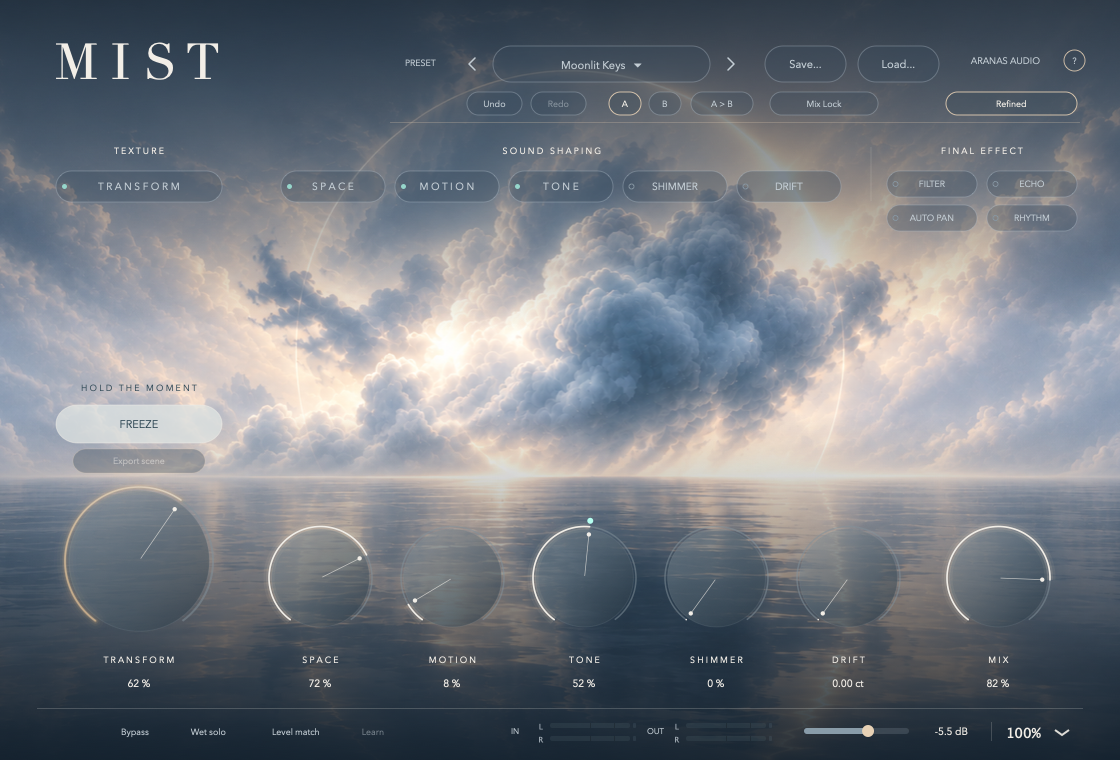
有些聲音,動人的不只是一瞬間。MIST 把演奏留下的片段輕輕疊起,讓殘響、音高與流動接續說話;你也可以用 Mix,留下原音熟悉的輪廓。Some sounds stay with us beyond the moment they are played. MIST layers fragments of your performance, letting reverb, pitch and movement carry them forward. Use Mix to keep the familiar outline of the original sound.
為一幕尚未說出口的情緒,或一段需要留白的配樂,試著多留一點餘韻。MIST 是音訊效果器,所有風景都從你送進來的聲音開始。Leave a little more resonance for an unspoken emotion or a score that needs room to breathe. MIST is an audio effect; every landscape begins with the sound you feed into it.
調整片段大小、重疊與位置。用 Freeze 留住當下最多四秒的聲音,繼續雕塑凝結的材質。Adjust fragment size, overlap and position. Freeze holds up to four seconds of captured audio so you can keep shaping the held texture.
塑造空間大小、尾韻、寬度與浮現速度。加入 Shimmer 的音高層次,讓殘響從音符後方展開。Shape room size, decay, width and swell. Add pitch-shifted layers with Shimmer and let the reverb unfold behind your notes.
以 Flow、Follow 與節奏變化帶出呼吸感,再用 Filter、Echo、Auto Pan 與 Rhythm 調整最後的聲音。Create a sense of breathing with Flow, Follow and rhythmic movement, then shape the final signal with Filter, Echo, Auto Pan and Rhythm.
MIST 0.12.10 · 免費版MIST 0.12.10 · Free release
目前提供 AU/VST3。沒有 Intel Mac、Windows 或公開 AAX 版本。AU / VST3 are available for Apple Silicon Mac only. There is no Intel Mac, Windows or public AAX release.
免費下載,無需登入。安裝前請閱讀使用授權與系統需求。Free download, no sign-in required. Read the usage licence and system requirements before installation.
先關閉 DAW,備份舊版外掛與重要專案。確認你使用 Apple Silicon Mac、macOS 14.4 以上,並以原生模式執行 DAW。Quit your DAW and back up older plug-ins and important projects. Use an Apple Silicon Mac with macOS 14.4 or later, and run your DAW natively.
在 Finder 按 ⇧⌘G 前往下列資料夾,將對應的完整 bundle 放入;若資料夾不存在可自行建立。In Finder, press ⇧⌘G to open the folders below and copy each complete bundle into its matching folder. Create the folders if needed.
AU:~/Library/Audio/Plug-Ins/Components/
VST3:~/Library/Audio/Plug-Ins/VST3/
重開 DAW,必要時重新掃描。Logic 路徑為 Audio FX → Audio Units → Aranas Audio → Aranas Mist。點外掛內的 Aranas Audio,確認版本為 0.12.10。Restart your DAW and rescan if needed. In Logic, choose Audio FX → Audio Units → Aranas Audio → Aranas Mist. Click Aranas Audio inside the plug-in to confirm version 0.12.10.
把 MIST 放在音訊或樂器軌的效果器位置。播放一段聲音,選擇 preset,再調 Transform、Space 與 Mix。先降低監聽音量,留意 OUT 表頭。Insert MIST as an effect on an audio or instrument track. Play audio, choose a preset, then adjust Transform, Space and Mix. Start with a low monitoring volume and watch the OUT meters.
此下載包僅提供 Apple Silicon Mac 的 AU/VST3。AAX 已有開發建置,但仍等待 Avid/PACE 申請、簽署及 Pro Tools 測試,目前不能視為公開支援。This package includes AU / VST3 for Apple Silicon Mac only. An AAX development build exists, but Avid / PACE applications, signing and Pro Tools testing are still pending. AAX is not publicly supported.
此版尚未經 Apple 公證,使用臨時簽章。只有在信任來源並核對校驗碼後才繼續。如系統沒有提供個別允許選項,請等待正式簽署/公證版本。This build uses an ad-hoc signature and is not notarized by Apple. Proceed only if you trust the source and have checked the checksum. If macOS offers no per-item allow option, wait for a properly signed and notarized release.Apple 安全性說明 ↗Apple security guidance ↗
使用授權允許免費用於個人與商業音樂、配樂及音效作品;你保有自己的作品,不需署名 Aranas Audio。第三方元件依各自授權處理。The licence allows free use in personal and commercial music, scores and sound effects. Your work remains yours, with no Aranas Audio attribution required. Third-party components retain their own licences.
播放時按 Freeze 捕捉聲音;有捕捉內容後可使用 Export scene 匯出 48 kHz/24-bit 立體聲 WAV。場景固定 20 秒:前 8 秒凝結聲音、後 12 秒尾韻。Freeze 素材可隨專案與自訂 preset 保存;殘響在重開時重新建立。Press Freeze during playback to capture audio, then use Export scene to render a 48 kHz / 24-bit stereo WAV. Each scene lasts 20 seconds: eight seconds of held audio followed by twelve seconds for the tail. Frozen audio is saved with projects and user presets; reverb tails rebuild on reopening.
本機 AU 通過 auval;AU/VST3 的臨時簽章已驗證。尚未完成跨電腦與跨 DAW 相容性測試,VST3 宿主實測仍待補齊。即時輸出沒有硬限幅器,請保留音量餘裕。The local AU build passed auval, and the AU / VST3 ad-hoc signatures were verified. Testing across computers and DAWs is incomplete, and VST3 host testing is pending. Live output has no hard limiter; leave sufficient headroom.
可免費用於個人與商業創作,作品無需署名 Aranas Audio。本授權不限制第三方條款授予的散布或銷售權利;第三方元件依各自授權處理。Free for personal and commercial creative use, with no Aranas Audio attribution required. This licence does not restrict distribution or sale rights granted under third-party terms. Third-party components retain their own licences.
閱讀完整使用授權 ↗Read the full licence ↗完整條款以使用授權與第三方通知為準。See the usage licence and third-party notices for the full terms.